Last Updated: May 2026 | Published by: DailyAgahi.com
Imagine standing in a queue under the hot Punjab sun for four hours, only to be told that the system is down and you should come back tomorrow. Or paying Rs. 200 to a local “agent” who promises to check your BISP status — and then learning that the same check is completely free and takes 30 seconds online.
Millions of Pakistani families have lived through this exact frustration. That is the entire reason the BISP 8171 Web Portal was created — to put the power of checking eligibility, tracking payments, and verifying CNIC details directly into your hands, from any phone or computer with internet access.
In this guide, we are not going to repeat what every other website says. We are going to walk you through the portal itself — what each section does, what every error message means, what to do when the portal is slow or not working, and how to use it like an expert. Whether you are checking your status for the first time or you are a long-time beneficiary trying to solve a payment issue, this guide is built for you.
Quick Reminder: The official portal address is 8171.bisp.gov.pk. There is no app required, no fee involved, and no agent needed. Always type the URL yourself rather than clicking links from WhatsApp messages or random websites.
What Is the BISP 8171 Web Portal?
The BISP 8171 Web Portal 2026 is the official digital service of the Benazir Income Support Programme (BISP) — the Government of Pakistan’s flagship social protection scheme. Think of it as a one-stop online window where eligible families can interact with BISP without visiting an office.
The portal is hosted on the government domain 8171.bisp.gov.pk and is directly connected to two main databases: NADRA’s identity records and the National Socio-Economic Registry (NSER). This connection is what makes real-time CNIC verification possible — the moment you enter your CNIC, the system pulls live data from both sources to tell you exactly where you stand.
Why the Number “8171”?
The number 8171 is not random. It is a government-assigned shortcode used across all major mobile networks in Pakistan — Jazz, Zong, Telenor, and Ufone. The same number works as both an SMS service and the website’s identifier, which makes it easy for people to remember. Even villagers with basic phones can text their CNIC to 8171 and get a reply.
What the Portal Replaces
Before the 8171 portal existed, beneficiaries had to:
- Travel to a BISP Tehsil office in person, often several kilometers away
- Wait in long queues for hours
- Depend on staff availability and office working hours
- Sometimes pay informal agents to “speed things up”
- Have no way to verify information independently
The portal removed every one of these barriers. Today, a widow in rural Sindh, a daily-wage worker in interior Balochistan, or a low-income mother in central Punjab can check her status in less than a minute — for free, from her own home.
| Feature | Before the Portal | With the 8171 Portal (2026) |
|---|---|---|
| Time to check status | Several hours to a full day | Less than 60 seconds |
| Cost | Travel + lost wages + sometimes agent fees | Free (only data charges if applicable) |
| Office visit needed | Yes, every time | Only for complex issues |
| Information accuracy | Depended on staff | Real-time from NADRA database |
| Available hours | Office hours only | 24 hours a day, 7 days a week |
| Rural accessibility | Very limited | Available anywhere with mobile network |
Complete Eligibility Criteria for Using the Portal
The portal itself is open to everyone — anyone can visit it and check a CNIC. However, what you see depends on whether the CNIC holder qualifies for BISP. Let us be very clear about who actually qualifies for assistance.
Who Qualifies for BISP Through the Portal
To see an “Eligible” status when you check, the CNIC holder must meet these conditions:
- The applicant must be a Pakistani citizen with a valid CNIC issued by NADRA
- The applicant must be a woman (the program is centered on female heads of household)
- The CNIC must be active and not expired
- The household must be registered in the NSER through the dynamic survey
- The PMT (Proxy Means Test) score must be at or below the eligibility threshold (currently 32, with discussions about raising it to 34)
- The biometric records (fingerprints) must be active in NADRA’s system
- The household should not own significant assets like cars, large land holdings, or have a government employee in a senior position
Who the Portal Will Mark as Ineligible
The portal will display “Not Eligible” or “Ineligible” status if any of the following apply:
- The CNIC has expired or is blocked
- The PMT score is above the eligibility threshold
- The NSER survey data is older than 3 years and has not been updated
- A family member is a confirmed government employee
- The household owns a registered vehicle in the family’s name
- The applicant has a record of frequent international travel
- The household electricity bill consistently exceeds the threshold (typically 200-300 units per month)
- False information was previously submitted in the survey
Reality Check: The portal does not lie or favor anyone. It simply shows what the database says. If you see “Ineligible,” it is not a glitch — it means your data either does not match the criteria, or it needs to be updated. The fix is in the data, not in the portal.
Required Documents Before You Use the Portal
Even though the portal only needs your CNIC number, you should keep certain documents nearby. This makes it easier to take action immediately based on what the portal shows.
Documents to Have Ready
- Original CNIC (or your CNIC number memorized correctly)
- Children’s B-Forms (for households with school-going children — needed for Taleemi Wazaif)
- Active mobile SIM registered under the CNIC holder’s name
- Most recent utility bill (for address verification if you visit a BISP office)
- Previous BISP confirmation SMS (if you have ever received one)
Why a CNIC-Linked SIM Matters
The portal sends important notifications and OTP codes to the registered mobile number. If your SIM is registered under someone else’s name (a husband, brother, or anyone else), you will not receive these messages. This is one of the most common reasons people miss critical updates from BISP.
To check whose name a SIM is registered under, send your CNIC number to 668 from any mobile network. You will receive a reply listing all SIMs registered under that CNIC.
Step-by-Step Guide to Using the BISP 8171 Web Portal
There are three main ways to interact with BISP through the 8171 system. We will explain each one, including what to expect at every step.
Method 1: Using the Web Portal (Online)
This is the most detailed method and gives you the most information.
Step 1: Open Your Browser Open Google Chrome, Safari, Firefox, or any browser on your phone or computer. Avoid using browsers inside other apps (like Facebook’s in-app browser) because they sometimes block government websites.
Step 2: Go to the Official URL Type 8171.bisp.gov.pk in the address bar. Do not click on links shared on WhatsApp or social media — many fake sites use similar names like “8171bisp.com” or “8171-portal.pk” to steal data.
Step 3: Read the Disclaimer The homepage shows a brief Urdu and English notice. Read it carefully — it confirms you are on the official site and explains the purpose of the portal.
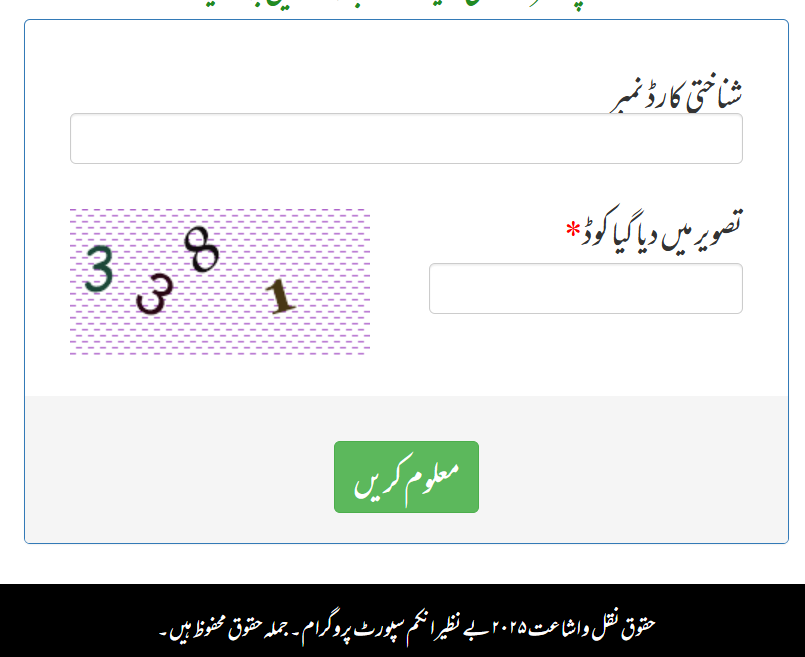
Step 4: Locate the CNIC Field You will see a single input box labeled “CNIC Number” along with a captcha image showing distorted letters or numbers.
Step 5: Enter Your 13-Digit CNIC Type your CNIC without dashes. For example, if your card shows 35202-1234567-8, you enter 3520212345678. Double-check before submitting.
Step 6: Solve the Captcha Look at the captcha image carefully and type the same letters/numbers in the captcha field. The captcha is case-sensitive in some versions. If you cannot read it, click the refresh icon to get a new one.
Step 7: Click “Check / Submit” Press the green submit button. The system will process your request — this usually takes 5 to 15 seconds.
Step 8: Read Your Result The portal will display one of several status messages, each meaning something specific (we explain these in detail below).
Method 2: Using SMS (No Internet Needed)
For families in remote areas, on basic phones, or when the internet is unstable, the SMS method is reliable.
- Open the Messages app on your phone
- Create a new message
- In the message body, type your 13-digit CNIC number with no spaces or dashes
- Send it to 8171
- Wait 1 to 5 minutes for the reply
The SMS reply uses simple Urdu or English to tell you whether you qualify. Standard SMS charges may apply depending on your network.
Method 3: Visiting a Tehsil Office (For Issues That Cannot Be Solved Online)
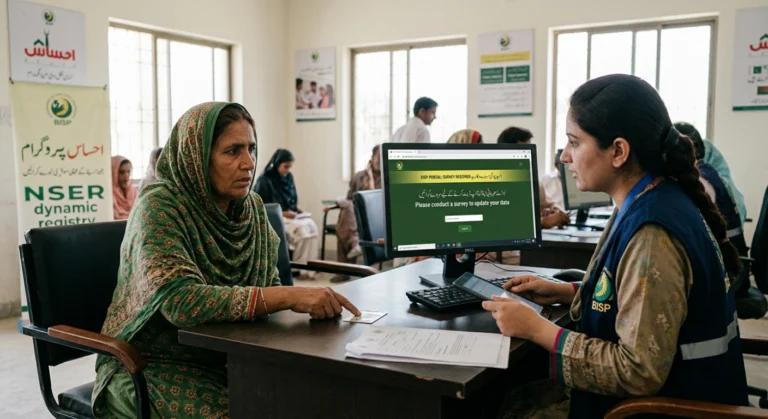
The portal is excellent for checking, but it cannot fix data problems on its own. For these situations, you must visit your local BISP Tehsil Office:
- Your status shows “Not Registered” but you completed a survey
- Your data shows incorrect information (wrong address, missing children, wrong household size)
- Your CNIC is showing as expired even though you have renewed it
- You believe your PMT score is wrong because your situation has changed
- The portal repeatedly shows error messages despite multiple attempts
Bring your CNIC, B-Forms, recent utility bill, and a notebook to write down any reference number the officer gives you.
Understanding What the Portal Shows You
This is where most guides fall short. The portal displays different status messages, and each one means something different. Here is a simple breakdown.
| Portal Message | What It Means | What to Do Next |
|---|---|---|
| Eligible / Aap is program ke liye eligible hain | You qualify for BISP Kafalat | Wait for payment SMS, then collect with biometric verification |
| Payment Released | Your installment has been issued | Visit a payment center with your CNIC |
| Payment Pending | Eligible but payment not yet released | Check again after 7-10 days |
| Not Eligible / Ineligible | You do not currently qualify | Visit BISP office to request re-survey if circumstances changed |
| Survey Pending | Your dynamic survey is incomplete | Visit Tehsil Office to complete the NSER survey |
| Information Not Found | CNIC is not in the BISP database | Apply for a new survey at the Tehsil Office |
| Biometric Verification Failed | Fingerprints did not match | Visit NADRA to update biometric data |
| Already Received | You have collected this installment | Wait for next quarter |
Pro Tip: Take a screenshot of the portal result every time you check. Save it with the date in your phone’s gallery. If anything goes wrong later, you will have a record of what the portal said.
Benefits of Using the 8171 Web Portal
The portal is not just a status checker — it is a complete service hub that has changed how millions of Pakistanis interact with social protection programs.
Direct Benefits to Beneficiaries
The portal saves both time and money. A typical BISP office visit used to consume an entire day — including travel, waiting, and the actual interaction. With the portal, the same information is available in under a minute. For families where every rupee matters, avoiding even one day of lost wages or transport costs is significant.
It also gives independence. Beneficiaries no longer need to rely on neighbors, agents, or shop owners to check their status. A woman who knows her own CNIC can verify her own eligibility privately, without anyone else knowing her financial situation.
System-Level Benefits
The portal has eliminated a huge problem the program faced for years — middlemen and ghost agents. When everyone can check status for free, no one needs to pay for that service. This single change has stopped the corruption that used to drain a meaningful share of beneficiaries’ payments.
It has also improved transparency and accountability. Every check, every payment, every survey update is logged in the database. If a complaint arises, BISP officials can trace the exact history of any case.
Connected Programs Accessible Through the Portal
The 8171 portal is the gateway to several BISP sub-programs. Here is a summary:
| Program | What It Provides | Currently Active |
|---|---|---|
| Benazir Kafalat | Quarterly cash payment to women | Yes |
| Benazir Taleemi Wazaif | Education stipend for school-going children | Yes |
| Benazir Nashonuma | Nutrition support for pregnant women and children | Yes |
| Emergency Cash Assistance | Disaster relief payments | When announced |
| Ramzan Relief Package | Discounted essentials in Ramadan | Seasonal |
Important Updates and Latest Changes (2026)
Several changes have been made to the portal and BISP system in 2026. Staying aware of these helps you avoid surprises.
Updated Payment Amount: The Kafalat installment was increased from Rs. 13,500 to Rs. 14,500 earlier in 2026. A further increase to Rs. 19,500 has been announced as part of the IMF agreement and is expected to start from January 2027.
Mobile Optimization: The portal was redesigned in early 2026 to work better on smartphones. The captcha is now bigger and easier to read, and the result page loads faster on slow connections.
Faster Database Sync: The portal now syncs with NADRA records more frequently — typically every 24 to 48 hours instead of weekly. This means biometric updates and CNIC renewals reflect on the portal much sooner.
Dynamic Survey Cleanup: In late 2025, around 2 million beneficiaries who had not updated their NSER survey within 3 years were removed from active eligibility. Many of these have since re-registered through April-May 2026 reopened windows.
Facial Biometric Integration: Since January 2026, the NADRA Facial Biometric System has been linked with BISP. Beneficiaries whose fingerprints do not work can use facial recognition as an alternative.
Phase 4 Distribution Active: As of May 2026, BISP is in Phase 4 of payment distribution. New districts are being added regularly, so even if your district was not in the earlier phases, your turn may be coming soon.
Pro Tip for 2026: If your status shows “Pending” and you live in a smaller district, do not panic. Phase-wise distribution means your area might just be later in the schedule. Check every 5-7 days rather than every day.
Common Mistakes and How to Avoid Them
Many people make the same mistakes when using the 8171 portal. Here are the most frequent ones along with practical solutions.
Mistake 1: Using Fake or Lookalike Websites
Many scam websites use names like “8171ehsaas.com,” “8171check.pk,” or “bisp-online.com” to trick people. They look almost identical to the real portal but exist only to collect CNIC numbers and personal data.
Solution: Always type 8171.bisp.gov.pk directly into your browser. The official URL has the .gov.pk extension, which is reserved for genuine Pakistani government websites. Bookmark it after the first successful visit.
Mistake 2: Entering CNIC With Dashes
People often type their CNIC the way it appears on the card (with dashes), which causes the portal to reject the input.
Solution: Always enter your CNIC as 13 continuous digits without any dashes, spaces, or special characters.
Mistake 3: Trying During Peak Hours
The portal is busiest right after a payment phase is announced. During these times, the system slows down or shows errors.
Solution: Check during off-peak hours — early morning (6 AM to 8 AM) or late evening (10 PM onwards). You will get faster responses and fewer errors.
Mistake 4: Believing Every WhatsApp Forward
Forwarded messages claiming “BISP Rs. 25,000 double payment” or “Free Rs. 50,000 grant — register now” are almost always fraud. BISP never announces special grants through WhatsApp forwards.
Solution: Trust only messages from the official 8171 shortcode. If a payment is real, it will appear on the official BISP website (bisp.gov.pk) and the 8171 portal. Anything else is a scam.
Mistake 5: Sharing Your CNIC With Random Agents
Some local “agents” claim they can fix your eligibility, increase your payment, or get you registered faster — for a fee. They cannot do any of this. They simply use your CNIC to make false applications, sometimes in your name without your knowledge.
Solution: All BISP services are 100% free. Never pay anyone, ever. Never share your CNIC with strangers, even those who claim to be from BISP.
Mistake 6: Not Updating Your NSER Data
A common surprise for old beneficiaries: their status suddenly changes from “Eligible” to “Survey Pending” or “Not Eligible.” The reason is almost always that their NSER survey is older than 3 years.
Solution: Mark a calendar reminder. If your last NSER survey was more than 2.5 years ago, visit your Tehsil Office to do an update. Do not wait for the deadline.
Mistake 7: Ignoring the “Survey Pending” Message
Some beneficiaries see “Survey Pending” on the portal and assume the system will update on its own. It will not.
Solution: A “Survey Pending” status is an active call to visit the Tehsil Office. Bring your CNIC and B-Forms, complete the dynamic survey, and your status will update within 10-30 days.
Frequently Asked Questions (FAQs)
Conclusion — Your Next Step
The BISP 8171 Web Portal 2026 is one of the most important digital services available to ordinary Pakistanis today. It puts power in your hands — the power to check your own status, verify your own eligibility, and avoid the agents and middlemen who used to control access to this information.
But the portal is only as useful as your willingness to use it correctly. The single most important habit you can build is this: check your status yourself, every quarter, on the official 8171.bisp.gov.pk site. Do not rely on rumors, do not pay agents, and do not trust WhatsApp forwards.
If you take three actions after reading this article, take these:
- Open 8171.bisp.gov.pk right now and check your CNIC. Even if you already know your status, confirm it.
- Save the official URL as a bookmark. This protects you from fake websites in the future.
- Tell at least one person in your community about the correct portal address. A neighbor, a relative, a friend — many people are still being scammed because they do not know the right address.
The government’s commitment to expanding the program — including the upcoming increase to Rs. 19,500 quarterly and the addition of new beneficiaries — makes 2026 and 2027 especially important years for staying registered and informed. The portal is the simplest tool you have for that.
Stay alert, stay updated, and never let anyone charge you for what is yours by right.