Last Updated: May 2026 | By DailyAgahi Team |
You scored 72% in Intermediate. You got admitted to a public university in Punjab. You are ready to start your BS degree. But there is one problem — you do not have a laptop, and your family cannot afford to buy one that costs Rs 80,000 or more.
This is the exact situation the CM Punjab Laptop Scheme 2026 was designed to solve.
Under Chief Minister Maryam Nawaz Sharif’s vision, the Punjab Government is distributing free high-performance laptops — Intel Core i7, 13th Generation — to deserving students enrolled in public and selected private universities across Punjab. Phase II of the scheme is currently live, with over 143,000 applications already received and the government reviewing proposals to expand distribution from 110,000 to potentially 220,000 devices.
But here is the problem many students are facing right now: they cannot figure out how to login to the portal, how to check their application status, or whether they even qualify. Some have applied but never received any update. Others are confused about deadlines that have been extended multiple times.
Don’t miss out on any announcements! Check the latest CM Punjab Laptop Scheme 2026 updates for the newest merit lists, deadline extensions, and Phase 2 registration guides.
This detailed guide from Daily Agahi answers every question — from portal login and registration to merit list checking, eligibility criteria, and the latest May 2026 updates. Written in simple language so that every student, whether from Lahore or a small village in South Punjab, can follow along without confusion.
What is the CM Punjab Laptop Scheme 2026?
The CM Punjab Laptop Scheme is a merit-based initiative operated by the Higher Education Department (HED) of Punjab. It provides free, brand-new laptops to academically talented students enrolled in higher education institutions across the province. The program was originally launched in 2011 and has gone through multiple phases over the years.
The 2026 edition — now in its Phase II — is the most expansive rollout to date. It is backed by a program budget of approximately Rs 27 billion and aims to bridge the digital divide between students who can afford technology and those who cannot.
This is not a loan, not a subsidy, and not a conditional grant. You apply, you qualify on merit, and you receive a brand-new laptop at no cost — forever yours.
“Eligible university students can now complete their CM Laptop Scheme 2026 online registration to receive a high-spec laptop for their studies.”
Key Facts at a Glance
| Feature | Details |
|---|---|
| Scheme Name | CM Punjab Laptop Scheme 2026 (Phase II) |
| Launched By | CM Maryam Nawaz Sharif |
| Operated By | Higher Education Department (HED), Punjab |
| Official Portal | cmlaptophed.punjab.gov.pk |
| Total Budget | Approximately Rs 27 billion |
| Target Distribution | 110,000 to 220,000 laptops (expansion under review) |
| Phase I Completed | 35,000+ students received laptops |
| Phase II Status | Applications closed; merit verification ongoing |
| Laptop Specs | Intel Core i7 (13th Gen), 8GB+ RAM, 512GB SSD |
| Operating System | Windows 11 with MS Office pre-installed |
| Selection Method | 100% merit-based, automated digital system |
| Application Fee | Completely free — zero charges |
| Helpline | +92-42-99213851 |
The biggest update in Phase II is that students from HEC-recognized private universities are now also eligible for the first time. Previously, only public sector students could apply — this change has made the scheme significantly more inclusive.
How to Login to the CM Punjab Laptop Scheme Portal
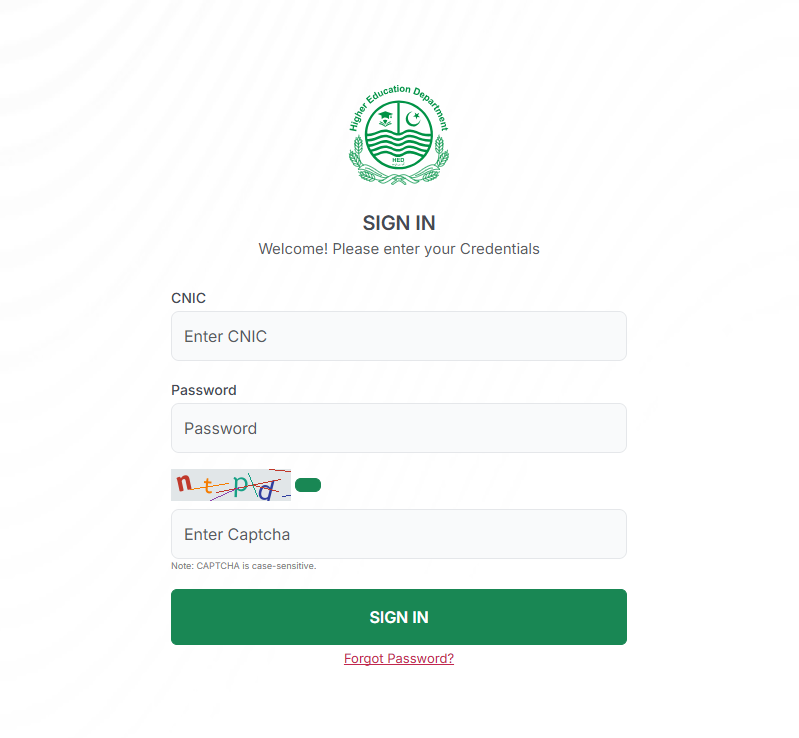
This is the section thousands of students are searching for. The login process is straightforward, but many people get confused because there are separate flows for new users (registration) and returning users (login).
For New Users — How to Create Your Account
If you have never applied before, you first need to register on the portal. Here is exactly how to do it:
Step 1: Open your browser and go to cmlaptophed.punjab.gov.pk — Make sure the URL contains “punjab.gov.pk” which confirms it is the official government website. Do not use any other link you find on social media.
Step 2: Click on “Sign Up” or “Register Now” on the homepage.
Step 3: Enter your CNIC number (or B-Form number if you do not have a CNIC yet). Enter your active mobile number and a valid email address.
Step 4: Create a strong password — use a mix of letters, numbers, and symbols. Write this password down somewhere safe because you will need it every time you log in.
Step 5: The system will send you a One-Time Password (OTP) via SMS to your registered mobile number. Enter this OTP on the screen to verify your account.
Step 6: Once verified, your account is created. You can now login and start filling out your application.
For Returning Users — How to Login
If you have already created an account and need to check your application status or update your information:
Step 1: Visit cmlaptophed.punjab.gov.pk
Step 2: Click on “Login” or “Sign In”
Step 3: Enter your CNIC/B-Form number and the password you created during registration.
Step 4: Click “Login” — you will be taken to your dashboard where you can see your application status, tracking ID, submitted documents, and any messages from the system.
Pro Tip: If you have forgotten your password, click on “Forgot Password” on the login page. The system will send a reset link to your registered email or mobile number. Make sure the email and phone number you used during registration are still active.
Warning: Never share your login credentials with anyone — not with agents, not with friends, not with anyone claiming to be from the government. Your login is your responsibility. If someone else submits incorrect information through your account, you will be disqualified.
Complete Eligibility Criteria — Who Can Apply?
The government has set clear rules to ensure laptops reach only deserving, academically strong students. Before you start the application, carefully check whether you meet every requirement.
You ARE Eligible If:
You hold a valid Punjab domicile from any district of Punjab. You are enrolled in the 1st or 2nd semester of a BS, MBBS, BDS, DVM, Nursing, or other eligible degree program. Your institution is a public sector university, college, medical college, or technical institute recognized by HEC. Alternatively, your institution is a private university listed on the HED-approved institutions list (new in Phase II). You achieved the required minimum marks in your last exam — the requirements vary by program type (see table below). You have not received a laptop under any previous CM Punjab or federal laptop scheme. You are not employed in any public or private sector job while studying.
Academic Requirements by Program
| Program Type | Minimum Required Marks |
|---|---|
| BS Programs (General/Non-Medical) | 65% or above in Intermediate |
| Medical/Dental Colleges (MBBS/BDS) | 80% or above in Intermediate |
| Engineering Universities | 60% or above in last annual exam |
| Agriculture/Veterinary Universities | 60% or above in last annual exam |
| MS/MPhil/PhD Scholars | 60% (annual) or 70% (semester) |
| Technology/Vocational Colleges | 60% or above in last exam |
Who is NOT Eligible
Even if you are a student in Punjab, you may be disqualified in certain situations. The scheme explicitly excludes students who have already received a laptop under any previous provincial or federal laptop distribution scheme. MS, MPhil, or PhD scholars who are currently receiving HEC scholarships cannot apply. Students who are employed in any kind of job — public or private — are not eligible. Students enrolled in semesters beyond the 2nd semester (3rd semester and above in BS) may not qualify for Phase II, though future phases may include them. Students from institutions not listed on the official HED portal are ineligible. Applicants whose CNIC or B-Form details do not match NADRA records will be automatically flagged and rejected.
Pro Tip: Not sure if your university is on the approved list? Visit cmlaptophed.punjab.gov.pk/view-institutes to see the complete list of eligible institutions. If your university is not listed, contact your institution’s administration — they may need to submit their data to HED.
Required Documents for Application
Having your documents ready before you start the online form will save you time and prevent errors. Here is the complete checklist:
| Document | Format | Important Notes |
|---|---|---|
| CNIC or B-Form | Clear scanned copy (JPG/PNG/PDF) | Must match NADRA records exactly |
| Punjab Domicile Certificate | Scanned copy | Must be from a Punjab district |
| Intermediate Marksheet/Result | Scanned copy | Shows your percentage for eligibility |
| University Enrollment Proof | Scanned copy | Admission letter or enrollment slip |
| Recent Passport-Size Photograph | Digital photo (JPG/PNG) | Clear, recent, with white background |
| Academic Transcript (if available) | Scanned copy | Latest semester result if applicable |
Pro Tip: Use a scanning app like CamScanner or Adobe Scan on your phone to create clear, high-quality scans. Blurry, dark, or cropped images are one of the top reasons for application rejection. Each file should ideally be under 2MB in size.
Warning: The name on your CNIC must exactly match the name on your domicile and academic records. Even a minor spelling difference — like “Muhammad” versus “Mohammad” — can cause your application to be flagged during verification.
Step-by-Step Application Process
The application process is entirely online. There is no offline or SMS-based application method for this scheme. Here is a detailed walkthrough:
Online Application (The Only Method)
Step 1 — Visit the Official Portal. Go to cmlaptophed.punjab.gov.pk on your phone or computer. Make sure you have a stable internet connection before starting.
Step 2 — Register Your Account. Click “Sign Up” and enter your CNIC/B-Form number, active mobile number, and email. Create a password and verify through OTP. (If you already have an account, simply log in.)
Step 3 — Fill in Personal Information. After logging in, enter your full name (exactly as on CNIC), father’s name, date of birth, permanent address, district, and contact details. Double-check every field.
Step 4 — Enter Academic Details. Select your institution from the dropdown list. Enter your program name (BS Computer Science, MBBS, etc.), current semester, and your marks or CGPA from your last exam. If your institution does not appear in the list, it may not be on the HED-approved list — contact your university administration.
Step 5 — Upload Documents. Upload clear scanned copies of all required documents. Make sure each file is readable and within the allowed size limit. If you get a “file size error,” reduce the image quality or use a compression tool.
Step 6 — Review Everything. Before clicking “Submit,” go through every single field one more time. Check your name spelling, CNIC number, marks percentage, and uploaded documents. One mistake can cost you your laptop.
Step 7 — Submit and Save Your Tracking ID. After submission, you will receive a tracking ID and a confirmation message. Write down or screenshot your tracking ID — this is your proof of application and you will need it to check your merit list status later.
How to Check Application Status After Submission
After submitting, log back into the portal using your CNIC and password. Your dashboard will show your current application status. You may also receive SMS and email updates at key stages of the process.
Status messages you may see include “Application Received,” “Under Verification,” “Verified by Institution,” “Selected for Merit List,” or “Not Selected.” If your status has not changed for more than two weeks, contact your institution’s designated focal person for the laptop scheme — institutional delays in verification are the most common cause of slow status updates.
Laptop Specifications — What Will You Receive?
The laptops being distributed under Phase II are not basic or low-end devices. These are high-performance machines designed for serious academic and professional work.
Laptop Specs Comparison
| Specification | CM Punjab Laptop 2026 | Typical Market Alternative |
|---|---|---|
| Processor | Intel Core i7 (13th Generation) | Core i3 or i5 (budget laptops) |
| RAM | 8GB or higher | 4GB (most budget options) |
| Storage | 512GB SSD | 256GB or HDD (slower) |
| Operating System | Windows 11 (Licensed) | Often no licensed OS |
| Software | MS Office pre-installed | Purchased separately (Rs 5,000+) |
| Market Value | Rs 120,000 – Rs 160,000 | N/A |
| Cost to Student | Rs 0 (completely free) | Rs 80,000 – Rs 160,000 |
| Warranty | Official manufacturer warranty | Varies |
These specifications mean students can comfortably run coding environments, engineering software, medical research tools, graphic design applications, and even freelancing platforms without any lag or performance issues.
Benefits Beyond the Laptop
The value of this scheme goes far beyond receiving a free device. Here is what this laptop actually means for your future:
Academic Excellence: With your own laptop, you can attend online lectures, access digital libraries, complete assignments on time, write research papers, and prepare presentations without depending on shared lab computers or borrowing from friends.
Freelancing Income: Students with laptops can start earning immediately through platforms like Fiverr, Upwork, and PeoplePerHour. Skills like content writing, graphic design, web development, SEO, and video editing can be learned for free on YouTube and Coursera — and monetized within weeks.
Digital Skills Development: Learning programming languages (Python, JavaScript, C++), data analysis, AI tools, and digital marketing becomes accessible when you have a personal laptop available 24/7.
Career Readiness: In today’s job market, almost every profession requires digital literacy. Having a laptop during your university years gives you a head start in building the technical skills employers look for.
Financial Relief for Families: A Core i7 laptop costs Rs 120,000 to Rs 160,000 in the market. For families earning Rs 30,000 to Rs 50,000 per month, purchasing one is simply impossible. This scheme removes that financial burden completely.
Important Dates and Timeline — May 2026 Update
| Milestone | Date/Status |
|---|---|
| Phase II Launch | January 2026 |
| Online Registration Opened | January 30, 2026 |
| Original Deadline | February 15, 2026 |
| Extended Deadline | February 28, 2026 |
| Further Extended Deadline | April 15, 2026 |
| Registration Status (May 2026) | Closed — no new applications accepted |
| Applications Received | 143,000+ |
| Institutional Verification | Ongoing (May 2026) |
| Provisional Merit Lists | Expected after verification completion |
| Final Merit Lists | To be announced on portal |
| Laptop Distribution | Expected to begin after merit finalization |
| Distribution Method | Through universities and colleges in official ceremonies |
| Phase I Distribution (Completed) | First ceremony held at University of Gujrat (Gujranwala Division) |
Critical Update for May 2026: Online registration for Phase II has closed. The government has confirmed that no further extensions will be given. If you missed the deadline, you will need to wait for a potential future phase. Currently, the HED is in the institutional verification stage — universities are cross-checking student data before final merit lists are prepared.
If you have already applied, keep checking your status on the portal. Distribution is expected to begin through official ceremonies at universities across Punjab, covering divisions like Lahore, Gujranwala, Multan, Rawalpindi, and South Punjab.
Common Mistakes and How to Avoid Them
Students lose their chance at free laptops every year because of preventable errors. Here are the most common ones:
Mistake 1: Applying from an institution not on the approved list. Not every university or college is part of this scheme. Before applying, check the list of eligible institutions at cmlaptophed.punjab.gov.pk/view-institutes. If your institution is not listed, applying will be a waste of time.
Mistake 2: CNIC mismatch with NADRA records. Even a single character difference between your CNIC details and what NADRA has on record will flag your application. Before applying, make sure your CNIC is updated and all details (name, father’s name, date of birth) are accurate.
Mistake 3: Uploading blurry or incomplete documents. Scanned documents must be clear, complete, and readable. If a verifier cannot read your marksheet or domicile, your application will be delayed or rejected. Take the extra five minutes to scan properly.
Mistake 4: Entering incorrect marks or CGPA. Your academic records will be verified by your institution. If the marks you enter in the form do not match your official transcript, you will be disqualified — and it will look like you tried to cheat the system.
Mistake 5: Not saving the tracking ID. After submission, the system gives you a tracking ID. Many students skip this step and then have no way to check their status later. Always save or screenshot your tracking ID immediately after submission.
Mistake 6: Applying when already employed. Students who are doing any kind of job — government or private — are not eligible. If this is discovered during verification, your application will be cancelled even if you made it to the merit list.
Mistake 7: Previous laptop recipients trying again. If you received a laptop under any previous phase (CM Punjab or PM Laptop Scheme), you cannot apply again. The system cross-checks previous records, and duplicate applications are automatically flagged.
Mistake 8: Using unofficial websites or agents. Some people create fake websites that look like the official portal. Others claim they can “guarantee” your selection for a fee. The official portal is cmlaptophed.punjab.gov.pk — nothing else. There is no fee, no agent, and no shortcut.
Mistake 9: Missing the laptop distribution date. Once selected, you must collect your laptop in person from your university with your original CNIC and tracking ID. If you miss your scheduled distribution date without informing your institution, your device may be reallocated to another student.
How the Merit List Works
Understanding the merit system can help manage your expectations and reduce anxiety during the waiting period.
Selection is 100% automated and merit-based. No recommendations, political connections, or fees influence who gets selected. The system ranks applicants based on their academic performance (marks percentage or CGPA). Universities verify student data before it is sent for final merit list preparation. The HED then publishes provisional merit lists on the portal. Students who believe there is an error can contact their institution’s focal person to file an appeal before the final list is published.
There are also special quotas built into the system. South Punjab students receive a 32% quota to ensure equitable distribution. A 10% quota is reserved for female students and students with disabilities. Minority students also receive consideration under special provisions.
Once the final merit list is published, it is searchable by CNIC on the portal. Selected students receive an SMS, an email, and a dashboard update confirming their selection.
Frequently Asked Questions (FAQs)
Conclusion and Call to Action
The CM Punjab Laptop Scheme 2026 is one of the most impactful student support programs in Pakistan’s history. With a Rs 27 billion budget, Core i7 laptops, merit-based selection, and the inclusion of private university students for the first time, this scheme has set a new standard for educational empowerment.
If you have already applied, your job now is to stay informed. Log in to the portal regularly, check your application status, and make sure your institution has completed the verification process. When merit lists are announced, check your name by CNIC. And when the distribution date comes, be there — with your CNIC and tracking ID — ready to collect your laptop.
If you missed the Phase II deadline, do not lose hope. The government has been expanding the scheme with each phase. Stay connected with the official portal and Daily Agahi for updates on future phases.
What you should do right now: If you applied, log in to cmlaptophed.punjab.gov.pk and check your current status today. If your status is stuck, contact your institution’s focal person. Share this guide with classmates who may be confused about the process. And above all, stay away from unofficial websites and agents who promise guaranteed selection — the only thing that guarantees selection is your merit.
Your education matters. Your future matters. And this laptop could be the tool that changes everything.